Reverse Sales Tax Calculator: How to Remove Tax From a Total
Shanzay Arain·Jul 12, 2026
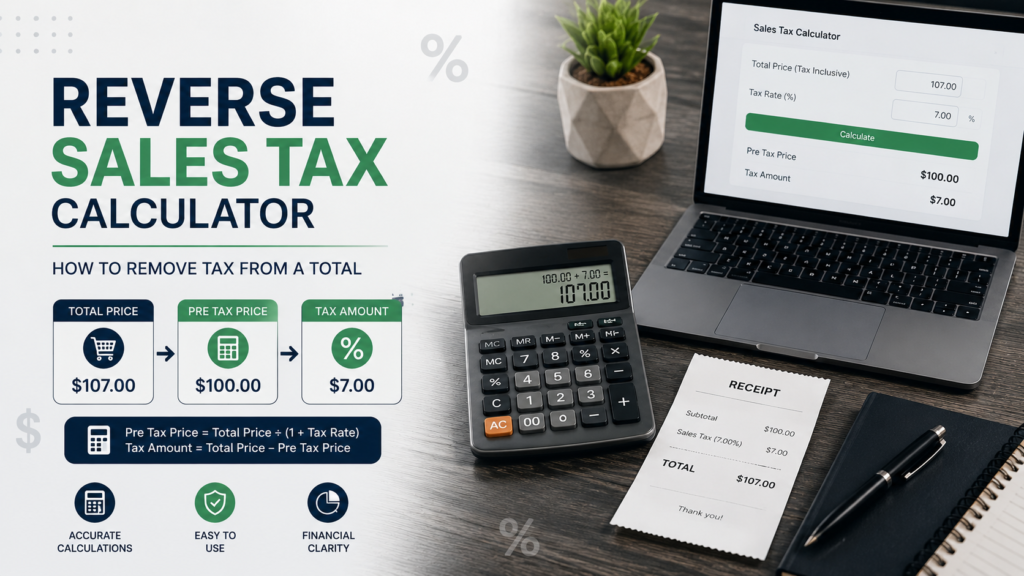
A reverse sales tax calculator helps you find the original price of a product or service when you only know the final amount paid, including tax.
For example, imagine that a receipt shows a total payment of $108.25 and the applicable sales tax rate is 8.25%. Instead of subtracting 8.25% directly from the total—which would produce an incorrect result—you must divide the total by 1.0825.
This calculation can be useful when reviewing receipts, preparing invoices, recording business expenses, reconciling accounts, or separating sales revenue from tax collected.
The formula is simple, but accuracy depends on using the correct tax rate and understanding whether the total includes only sales tax or also contains tips, service charges, shipping fees, discounts, or other taxes.
What Is a Reverse Sales Tax Calculator?
A reverse sales tax calculator is a financial tool that works backward from a tax inclusive total. It separates the amount into two parts
The original price before sales tax
The sales tax included in the final payment
A normal sales tax calculator starts with the pre tax price and adds tax. A reverse calculator begins with the final amount and removes the tax.
This distinction is important because sales tax is normally calculated as a percentage of the original taxable price—not as a percentage of the final tax inclusive amount.
Regular Sales Tax vs. Reverse Sales Tax
A regular sales tax calculation answers this question
How much will I pay after tax is added?
A reverse sales tax calculation answers
How much was the original price before tax?
Here is the difference
Calculation Type
Known Information
Result
Regular sales tax
Pre tax price and tax rate
Tax and final total
Reverse sales tax
Final total and tax rate
Pre tax price and included tax
Tax rate calculation
Pre tax price and final total
Effective tax percentage
Quick Summary Table
Item
Explanation
Main purpose
Remove sales tax from a tax inclusive total
Required inputs
Final total and applicable tax rate
Pre tax formula
Total ÷ (1 + tax rate as a decimal)
Included tax formula
Total − pre tax price
Common users
Consumers, retailers, accountants and business owners
Main risk
Entering the wrong state, county, city or product specific rate
Cost to use
Most basic online calculators are free
Best practice
Confirm the rate through an official tax authority
Reverse Sales Tax Formula
The standard reverse sales tax formula is
Pre Tax Price = Tax Inclusive Total ÷ (1 + Sales Tax Rate)
The sales tax rate must be converted from a percentage into a decimal.
For example
5% becomes 0.05
6.5% becomes 0.065
8.25% becomes 0.0825
10% becomes 0.10
After finding the pre tax price, calculate the tax included in the total
Included Sales Tax = Final Total − Pre Tax Price
You can also calculate the included tax directly
Included Sales Tax = Final Total × [Tax Rate ÷ (1 + Tax Rate)]
Reverse Sales Tax Calculator Formula
Enter the following information
T Final total, including tax
R Sales tax rate as a percentage
Then calculate
Pre Tax Price = T ÷ (1 + R ÷ 100)
Sales Tax Included = T − Pre Tax Price
How It Works
Suppose you paid $108.25 for an item and the sales tax rate was 8.25%.
Convert the Rate Into a Decimal
8.25 ÷ 100 = 0.0825
Add One to the Decimal Rate
1 + 0.0825 = 1.0825
Divide the Final Total
$108.25 ÷ 1.0825 = $100.00
Calculate the Tax Included
$108.25 − $100.00 = $8.25
The results are
Calculation
Amount
Final price
$108.25
Original price
$100.00
Sales tax
$8.25
Tax rate
8.25%
The original product price was $100, and the final total contained $8.25 in sales tax.
Why You Cannot Simply Subtract the Tax Percentage
One of the most common mistakes is subtracting the tax rate directly from the final price.
Suppose the final price is $108 and the tax rate is 8%.
The incorrect calculation would be
$108 − 8% = $99.36
However, the correct calculation is
$108 ÷ 1.08 = $100
The incorrect method fails because the $8 tax was calculated as 8% of the original $100 price. It was not calculated as 8% of the final $108 total.
Dividing by the tax multiplier correctly reverses the original calculation.
More Reverse Sales Tax Examples
Example With a 5% Tax Rate
A customer pays $210, including 5% sales tax.
Pre tax price
$210 ÷ 1.05 = $200
Tax included
$210 − $200 = $10
Example With a 7% Tax Rate
A receipt shows a final total of $53.50, including 7% tax.
Pre tax price
$53.50 ÷ 1.07 = $50
Tax included
$53.50 − $50 = $3.50
Example With a 9.5% Tax Rate
A business purchase totals $438, including 9.5% tax.
Pre tax price
$438 ÷ 1.095 = $400
Tax included
$438 − $400 = $38
How to Use a Reverse Sales Tax Calculator
Find the Final Tax Inclusive Amount
Locate the total amount paid on the receipt, invoice, point of sale record, or bank transaction.
Make sure the amount actually includes sales tax. Some receipts list the subtotal and tax separately, making reverse calculation unnecessary.
Confirm the Applicable Sales Tax Rate
Identify the combined rate that applied to the transaction. Depending on the location, this may include
State sales tax
County sales tax
City or municipal tax
Special district tax
In the United States, tax obligations and rates can vary according to location, business activity, and the type of product or service. The U.S. Small Business Administration recommends checking with relevant state and local governments for applicable tax requirements.
Convert the Rate to Decimal Form
Divide the percentage by 100.
For example
7.75 ÷ 100 = 0.0775
Divide by the Tax Multiplier
Add one to the decimal rate and divide the total by that number.
If the total is $215.50 and the rate is 7.75%
$215.50 ÷ 1.0775 = $200
Subtract to Find the Included Tax
$215.50 − $200 = $15.50
Round According to Local Rules
Currency calculations are usually rounded to two decimal places, but tax authorities, accounting software, and point of sale systems may apply specific rounding methods.
For bookkeeping or tax filing, use the method required by the relevant jurisdiction rather than relying only on a general online calculator.
Using the Formula in Excel or Google Sheets
A reverse sales tax calculation can be automated in a spreadsheet.
Suppose
Cell A2 contains the tax inclusive total
Cell B2 contains the tax rate as a percentage number, such as 8.25
Use this formula for the pre tax price
=A2/(1+B2/100)
Use this formula for the included sales tax
=A2 (A2/(1+B2/100))
If cell B2 is already formatted as a percentage, such as 8.25%, use
=A2/(1+B2)
This method can help businesses process multiple transactions, but the results should still be compared with invoices, point of sale reports, and official tax records.
Benefits and Risks
Benefits of a Reverse Sales Tax Calculator
A reverse calculator offers several practical advantages.
Fast calculations It eliminates the need to rearrange the sales tax formula manually.
Better bookkeeping Businesses can separate gross receipts from sales tax collected.
Receipt verification Consumers can estimate the original price and confirm the tax portion of a purchase.
Invoice preparation Freelancers and businesses can break a tax inclusive payment into revenue and tax components.
Budget analysis Shoppers can compare pre tax prices across locations with different tax rates.
Useful for refunds A reverse calculation may help identify the pre tax value of a returned item when only the final paid amount is available.
Risks and Limitations
A calculator is only as accurate as the information entered.
Incorrect rate Using a state rate without applicable local taxes may produce the wrong result.
Product exemptions Groceries, clothing, medicine, digital products and professional services may receive different tax treatment depending on the jurisdiction.
Tax holidays A product may have been exempt during a temporary sales tax holiday.
Mixed purchases A receipt may contain taxable and non taxable items.
Additional charges Tips, delivery fees, environmental fees, tourism taxes and service charges may not be part of the sales tax base.
Rounding differences Calculating tax on each item can produce a slightly different result from calculating it on the total invoice.
Not every state or locality applies sales tax, and exemptions may apply to certain products. Businesses therefore need to confirm both the rate and whether the specific transaction is taxable.
Step by Step Guide for Business Owners
Separate Taxable and Non Taxable Sales
Do not apply one reverse calculation to an invoice containing both taxable and exempt products unless the invoice provides enough information to separate them.
Group transactions according to their tax treatment first.
Identify the Correct Jurisdiction
Determine whether the transaction is taxed according to the sellers location, buyers location, delivery address, or another sourcing rule.
The applicable rule can vary, particularly for online and remote sales.
Use the Combined Rate
Enter the total rate applied to the transaction, not only the state level rate.
Official state rate lookup tools may allow users to search by address or ZIP code and can provide effective dates for rate information.
Record Revenue and Tax Separately
Sales tax collected from customers generally should not be treated as ordinary sales revenue in business records.
A simplified bookkeeping entry might separate
Cash or accounts receivable
Product or service revenue
Sales tax payable
The correct accounting treatment depends on the business, jurisdiction, and applicable reporting standards.
Compare the Result With Your Point of Sale Report
A reverse calculation is useful for checking figures, but the businesss point of sale system, invoices, transaction level records, and filed returns should remain the primary documentation.
Consult a Tax Professional When Necessary
Professional help may be appropriate when a business sells in multiple jurisdictions, handles exempt customers, has remote sales obligations, or sells products with complicated taxability rules.
Reverse Sales Tax for Online and Remote Sales
Online sales can involve more than one tax jurisdiction. The rate may depend on where the customer receives the product rather than where the seller operates.
Remote sellers may also have registration and collection obligations after crossing a states economic nexus threshold. Streamlined Sales Tax guidance notes that many states have enacted economic nexus rules for remote sellers, although the requirements and thresholds are not identical across all states.
A reverse sales tax calculator cannot determine whether a seller has nexus, whether a product is taxable, or where the transaction should be sourced. It only performs the mathematical calculation after the correct rate has been identified.
Reverse Sales Tax for Discounts, Coupons and Refunds
Discounts can change the amount subject to sales tax.
Suppose an item is priced at $100 but receives a $20 discount before tax. If the rate is 8%, tax may be calculated on the discounted $80 amount
$80 × 8% = $6.40
Final total
$80 + $6.40 = $86.40
Reversing the $86.40 total at 8% gives
$86.40 ÷ 1.08 = $80
The result reflects the taxable price after the discount, not the original advertised price.
Coupon treatment can vary. Merchant funded and manufacturer funded discounts may not always receive identical tax treatment. Refund calculations may also depend on whether the tax was originally collected and whether the seller refunds the full or partial purchase price.
Combined and Compound Tax Rates
In many transactions, state and local rates are added together before tax is calculated.
For example
State rate 6%
Local rate 2%
Combined rate 8%
The reverse calculation would use 8%
Total ÷ 1.08
However, some jurisdictions or tax systems may apply taxes sequentially, meaning one tax is calculated on an amount that already includes another tax. In that situation, simply adding the rates may not be correct.
For two truly compound rates, the formula would be
Pre Tax Price = Total ÷ [(1 + Rate One) × (1 + Rate Two)]
Always confirm whether the taxes are combined or compounded before calculating.
Common Mistakes to Avoid
Subtracting the Percentage Directly
Do not subtract 8% from a tax inclusive total to remove an 8% tax. Divide the total by 1.08 instead.
Entering the Rate as a Whole Number
In a manual formula, 8% must be entered as 0.08—not 8.
Some calculators accept the percentage as 8, while others expect 0.08. Check the input format.
Using Only the State Rate
County, city and special district taxes may increase the combined rate.
Ignoring Product Specific Tax Rules
The standard rate may not apply to food, clothing, medicine, software, subscriptions, services or other categories.
Including Tips in the Taxable Total
A restaurant bill may include sales tax, a service charge and a voluntary tip. The entire payment should not automatically be treated as a single tax inclusive sales amount.
Mixing Multiple Tax Rates
An invoice containing items taxed at different rates cannot always be reversed accurately with one percentage.
Confusing Sales Tax With an IRS Deduction Calculator
A transaction level reverse sales tax calculator removes tax from a purchase total. The IRS Sales Tax Deduction Calculator serves a different purpose it helps eligible taxpayers estimate state and local general sales tax for an itemized federal income tax deduction.
Treating an Estimate as an Official Tax Record
Calculator results do not replace receipts, invoices, exemption certificates, point of sale reports, tax returns, or advice from a qualified professional.
Latest Update
As of July 12, 2026, there is no universal sales tax rate that can be used for every U.S. transaction. Applicable rates and taxability continue to depend on the state, local jurisdiction, product or service, transaction date, and the sellers circumstances.
Official rate and boundary files may include effective dates, which is important because local tax rates can change. Businesses should verify the applicable rate through a state revenue department, official address based lookup tool, or another authoritative government source before collecting, reporting, or reverse calculating sales tax.
The mathematical reverse tax formula normally remains the same. What changes is the rate, taxable base, exemption treatment, sourcing rule, or reporting requirement.
Expert Tips
Save the Original Receipt
The receipt may show the taxable subtotal, tax amount, tax jurisdiction and individual product treatment. This is more reliable than reconstructing a transaction from a bank statement.
Verify the Transaction Date
Use the rate that applied when the sale occurred. A current tax rate may differ from the historical rate on an older receipt.
Use an Address Based Rate Lookup
ZIP codes can cross tax boundaries. A full address lookup may be more accurate than entering only a city or ZIP code.
Review Each Fee Separately
Separate the product price, shipping, delivery fee, service charge, tip and sales tax before performing a reverse calculation.
Keep More Decimal Places During Calculation
Avoid rounding the pre tax result too early. Complete the calculation first and round the final monetary values according to the required rules.
Document Manual Adjustments
When bookkeeping figures differ from a receipt because of rounding, discounts, refunds or exempt items, keep a note explaining the adjustment.
Reconcile Sales Tax Regularly
Business owners should compare tax collected with point of sale records and sales tax payable accounts. Regular reconciliation can help identify incorrect rates or reporting errors before a filing deadline.
Conclusion
A reverse sales tax calculator makes it easy to separate a tax inclusive total into the original price and the sales tax paid. The basic calculation is to divide the final total by one plus the sales tax rate in decimal form.Although the formula is straightforward, accurate results require the correct combined rate and a clear understanding of which items and fees were taxable. Consumers can use the result for budgeting or receipt verification, while businesses can use it as a supporting tool for invoices and bookkeeping.For tax reporting, always confirm current rates, exemptions and sourcing rules through the appropriate tax authority or a qualified professional.
FAQs
How do I calculate the original price before sales tax?
Divide the final tax inclusive price by one plus the tax rate in decimal form.
For an 8% rate
Original Price = Final Total ÷ 1.08
If the total is $108, the original price is $100.
What is the formula for removing sales tax from a total?
Use
Pre Tax Price = Total ÷ (1 + Tax Rate ÷ 100)
Then subtract the pre tax price from the total to find the sales tax included.
Can I subtract the tax percentage from the final price?
No. Directly subtracting the percentage usually produces the wrong answer because the tax was calculated from the original price, not the tax inclusive total.
How do I find the sales tax included in a receipt?
First divide the final total by the tax multiplier to calculate the pre tax price. Then subtract the pre tax price from the total
Included Tax = Final Total − Pre Tax Price
Can a reverse sales tax calculator handle combined rates?
Yes, provided you enter the correct combined rate. For example, a 6% state tax and 2% local tax may produce a combined 8% rate. However, confirm that the taxes are additive rather than compounded.
Why does my calculated tax differ from the receipt?
Differences can result from item level rounding, discounts, exempt items, multiple rates, shipping charges, service fees, tax holidays or an incorrect rate.
Is a reverse sales tax calculation accepted for tax filing?
It may help check or reconstruct figures, but it does not replace official receipts, accounting records, point of sale reports or tax documentation. Businesses should follow the recordkeeping and filing requirements of the relevant tax authority.
I am a professional finance content writer with expertise in personal finance investing, banking, loans, insurance, credit cards, budgeting, and market related topics. I create clear, SEO optimized, and reader friendly finance content that helps audiences understand complex financial concepts in simple words. My goal is to write trustworthy and engaging content that improves search visibility, builds credibility, and supports business growth.
I am a professional finance content writer with expertise in personal finance investing, banking, loans, insurance, credit cards, budgeting, and market related topics. I create clear, SEO optimized, and reader friendly finance content that helps audiences understand complex financial concepts in simple words. My goal is to write trustworthy and engaging content that improves search visibility, builds credibility, and supports business growth.